
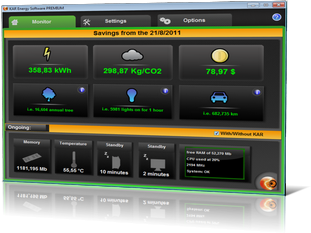
Consumption analyse

Easy and powerful!
Analyze and evaluates the energy consumption of your computers.
KAR Audit in 10 points:
- Energy cost analyse of your computers.
- Determine the duration of the audit.
- Setting several types of use (min, normal, max).
- Before/after comparisons.
- Graphic consumption display.
- Grouped or single choice.
- Detailed report including analysis of the PC (RAM, CPU, Wh).
- Consumption reduction result.
- Saving and printing data.
- Export to Office format.
How does it work?
Principle :
Based on approximately 5 to 10 computers, we first make an analysis on one or two working days, then perform the same steps with our KAR Energy Software PREMIUM solution installed and set to the same environment.
The audit concludes with a power consumption highlighting the following indicators before and after implementation of our solution KAR Energy Software PREMIUM:
- Wattage of each computer and all the computers in the period
- Utilisation rate of the CPU of each machine
- Rate of memory usage of each machine
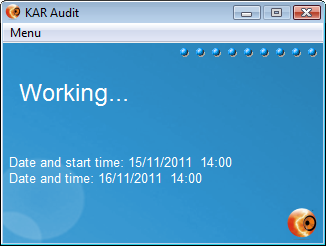
KAR Audit is a small application recording and showing indicators of the power consumption of the typical working environment of your company (PCs, laptops, servers...).
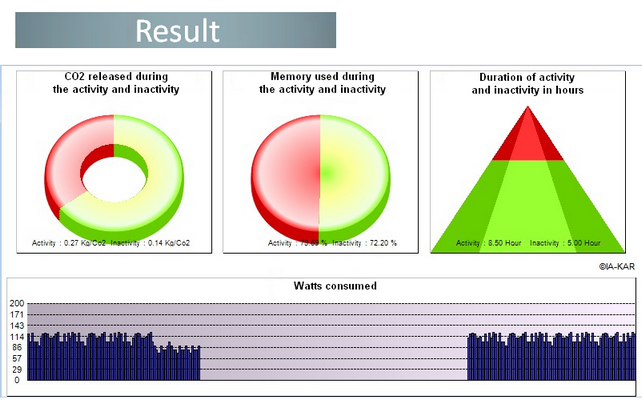
A full analyse
Based on collected consumptions datas in the previous steps (with and without KAR Energy Software PREMIUM), we will develop a report on the reduction of power consumption recorded, on different machines (PCs and laptops) and established practice (use small, normal, thrust).
Green IT session, from theory to practice
Objectives
This training will help you identify the main energy costs of a computer fleet and highlight the methods and tools to cut consumption by half.
Duration:
One day
Intended for:
- CIOs, sustainability managers,
- Datacenter managers,
- Purchasing managers,
- Workstation managers.
Program
1) Green IT challenges:
- Environmental footprint of ICT
- Impact on electricity consumption and carbon footprint
2) Analysis and energy audit:
- Calculate the electricity consumption of a fleet
- Recycle computers according to their capabilities
- Why not renew the entire fleet every year
3) The workstation environment:
- Strategy of major manufacturers
- How to choose your workstation
- Extend hardware lifespan
- Reduce your computer's power consumption
4) The datacenter environment:
- Electricity cost and energy consumption
- Centralize data and reduce energy costs
- Towards greener datacenters
5) Successful Green IT projects:
- Study the issues
- Find overconsumption points
- Raise user awareness
6) Practical case
- Perform a consumption audit
- Analyze the audit report
- Which strategies for which savings?
- And with KAR Energy Software?
Testimonials
Average rating: 5.0/5 (5 reviews published on this site)
« Using KAR Energy Software improves performance and extends component lifespan »

« This software lets us use again computers we thought were obsolete — Technology teacher »
« I had the chance to test it for a few days and was pleasantly surprised by its efficiency; my PC RAM was much less stressed and thanks to power scheduling it slept and woke automatically at set times »