
What is the electricity consumption of a desktop PC? Figures, calculation and tips to save
A workstation that weighs on your electricity bill
The consumption of IT devices represents a significant share of household electricity use. A desktop computer left on permanently can consume up to $215 in electricity per year. But concretely, how much does a desktop PC consume? What factors influence its consumption? And how can you reduce it effectively? Discover in this guide all the answers to manage your energy budget.
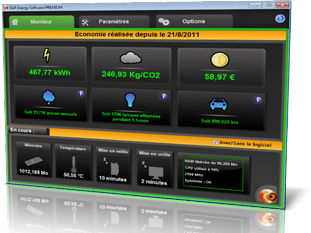
KAR Energy Software: the Green IT software that reduces your PC consumption by up to 48%
If you want to sustainably reduce your computer's electricity consumption, there is an automated and powerful solution: KAR Energy Software. This energy management software reduces the electricity consumption and carbon footprint of your computer (desktop or server) by up to 48%.
Unlike standard Windows settings, this software works in depth in 4 complementary ways:
- RAM consumption optimization: the software automatically frees unused RAM to reduce component load.
- Sleep mode for unused CPU components: unused processor parts are put to sleep to save energy.
- Fine-tuned power management: consumption is adapted in real time to your machine's actual needs.
- Intelligent sleep mode: the computer is put to sleep during prolonged inactivity and can be woken automatically.
The concrete benefits of KAR Energy Software are numerous:
- Up to 48% reduction in your IT fleet's energy consumption.
- Extended hardware lifespan through intelligent management.
- Increased battery life for laptops.
- Computer acceleration up to 5 times faster.
- Lower processor temperature by 10 °C on average.
Discover KAR Energy Software and calculate your return on investment now: https://www.ia-kar.com/en/software-energy-saver.php
How much does a desktop PC consume? Key figures
The electricity consumption of a desktop computer depends on several factors: its type, power, usage duration and accompanying equipment. Here are the essential data to remember.
Standard desktop PC
A desktop computer consumes on average 123 kWh per year, or approximately $26 at regulated rates, for average use of 3h45 per day.
A fully equipped desktop PC (tower, monitor, printer, speakers) consumes on average 219 kWh/year, or approximately $27/year.
The instantaneous power of a desktop PC is generally between 100 and 250 watts per hour.
Laptop
For comparison, a laptop consumes on average 22 kWh per year, or approximately $5.
A laptop consumes 50 to 80% less electricity than a desktop PC.
Most laptop models consume between 50 and 100 Wh.
Gaming PC
A gaming PC is much more energy-intensive due to its powerful graphics card and high-performance components.
A mid-range gaming PC typically consumes around 600 kWh per year, or approximately $115 in electricity.
A high-end gaming PC can exceed 500 kWh with intensive use, or even reach 900 kWh per year for 8 hours of daily use.
Factors that influence your desktop PC's consumption
Your desktop computer's electricity consumption can be assessed based on several factors.
Computer type
A desktop computer consumes significantly more than a laptop. The energy consumed by a desktop PC represents approximately half that of a laptop.
A standard desktop PC has an instantaneous power of approximately 200 W, compared to 50 to 100 W for a laptop.
Usage duration
The longer your machine is plugged in, the higher the electricity consumption.
For a 200 W desktop PC used 8 hours per day, annual consumption reaches 584 kWh, or approximately $126.
A desktop PC used 4 hours per day with 250 W power consumes 365 kWh/year.
Power and performance
A basic computer consumes less than a sophisticated model with more powerful components.
The more powerful the PC, the more energy it consumes. A gaming PC with a 3D graphics card can consume 300 Wh in one hour.
Peripheral equipment
Equipment that accompanies your computer also affects your electricity bill.
- A flat screen consumes between 10 and 30 Wh.
- An internet router consumes approximately 10 W.
- Speakers can consume 20 W.
- A printer in standby consumes approximately 5 W.
How to calculate your PC's electricity consumption?
To know precisely your computer's consumption, use the following formula:
Annual consumption (kWh) = Power (in watts) × Hours of use per day × 365 days / 1000
Concrete examples:
- Standard desktop PC (200 W) used 4h/day: 200 × 4 × 365 ÷ 1000 = 292 kWh/year (approximately $63)
- Standard desktop PC (200 W) used 8h/day: 200 × 8 × 365 ÷ 1000 = 584 kWh/year (approximately $126)
- Gaming PC (300 W) used 8h/day: 300 × 8 × 365 ÷ 1000 = 876 kWh/year (approximately $190)
- Laptop (60 W) used 4h/day: 60 × 4 × 365 ÷ 1000 = 87.6 kWh/year (approximately $18)
PC consumption in sleep mode and when off
Even when turned off but not unplugged, a computer continues to consume energy. This is called phantom consumption.
- A computer in sleep mode consumes approximately 5 watts.
- A computer turned off but plugged in consumes approximately 70 Wh per day.
- Devices in standby consume the equivalent of 7 light bulbs running 365 days a year.
To avoid this waste, use a smart power strip or unplug your equipment at the end of the day.
6 tips to reduce your desktop PC's electricity consumption
1. Enable power saving mode
Windows offers a power saving mode that automatically reduces your computer's consumption. You can reduce your consumption by 10 to 40%.
How to do it: Settings > System > Power & battery > Power mode > Best power efficiency.
2. Reduce sleep mode delays
Configure automatic screen shutdown and sleep mode after a period of inactivity.
Recommended configuration:
- Screen shutdown: 5 to 10 minutes
- Sleep mode: 10 to 15 minutes
3. Use a smart power strip
Equipment in standby continues to consume energy. A smart power strip cuts power with a single action.
- Save up to 30 W per device in standby
- Ideal for computer, printer and speakers
4. Choose a laptop
If you don't need extreme power, a laptop consumes 50 to 80% less than a desktop PC.
5. Choose efficient hardware
When purchasing, prioritize devices designed to be energy efficient. Check Green IT certifications.
6. Shut down completely at end of day
Regularly shutting down and restarting your computer allows your hardware to "rest" and last longer.
FAQ - Frequently asked questions about desktop PC electricity consumption
What is the average consumption of a desktop PC?
A desktop computer consumes on average 123 kWh per year, or approximately $26 at regulated rates, for use of 3h45 per day.
How much does a gaming PC consume per year?
A mid-range gaming PC typically consumes around 600 kWh per year, or approximately $115 in electricity. A high-end gaming PC can exceed 500 kWh with intensive use.
Does a computer turned off but plugged in still consume?
Yes. Even when turned off but not unplugged, a computer continues to consume energy, approximately 70 Wh per day. This is called phantom consumption.
How do I calculate my computer's electricity consumption?
Use the formula: Power (W) × Hours of use × 365 days ÷ 1000 = Consumption in kWh. Then multiply by the price per kWh (approximately $0.22/kWh) to get the annual cost.
Does a laptop really consume less than a desktop PC?
Yes. A laptop consumes 50 to 80% less electricity than a desktop PC. Its average consumption is 22 kWh/year compared to 123 kWh/year for a desktop PC.
Is KAR Energy Software compatible with all computers?
KAR Energy Software is compatible with desktop computers and servers running Windows. The software requires no Internet connection to operate and adapts to each machine's actual consumption.
Read also : Reduce PC energy consumption