
Increase your laptop battery life: 10 tips that really work
Why doesn't your battery hold a charge?
Whether you're traveling, in a meeting or working remotely, a battery that drains too quickly is a real brake on productivity. Fortunately, there are simple and effective solutions to improve your laptop's battery life. Discover in this complete guide all the tips to optimize your battery's lifespan, whether you're on Windows or macOS.
KAR POWER FASTER: the smart software that doubles your battery life
If classic software tips are not enough, there is an advanced solution to push energy optimization to its maximum. KAR Power Faster is a next-generation energy saver widget, designed to radically extend your computer's battery life while boosting its performance.
Unlike standard settings, this software acts in real time completely automatically, without requiring any intervention on your part:
- It doubles battery life of your laptop, notebook, ultrabook or tablet by finely adjusting consumption.
- It actively regulates temperature of the processor to prevent overheating, which preserves internal components and extends your machine's lifespan.
- It optimizes RAM management by automatically freeing unused resources, ensuring flawless smoothness.
- It intelligently manages processor clock speed by adapting it in real time to your actual needs, thus avoiding energy waste.
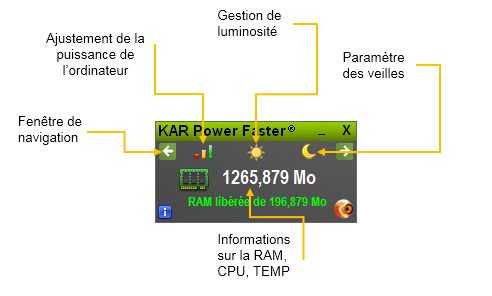
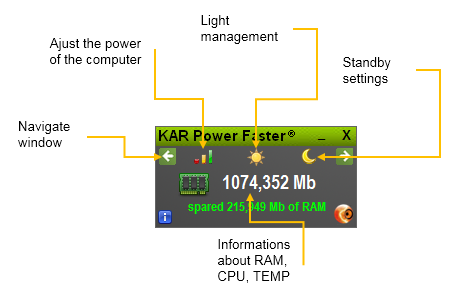
The software interface offers total transparency on its action:
- View in real time the amount of RAM used and that automatically freed by KAR Power Faster.
- Check your processor's current clock speed.
- Monitor CPU temperature, which the software constantly strives to reduce for optimal operation.
For advanced users, KAR Power Faster also offers fine configuration options: personalized screen brightness management, automatic sleep configuration, or manual processor frequency adjustment for even greater energy savings.
👉 Discover KAR Power Faster and download it now from the official website: https://www.ia-kar.com/en/laptop-battery.php
Why is your battery life crucial?
Understanding the issues related to your laptop's battery is the first step to better optimizing it. Good battery life offers you:
- Preserved productivity: no more untimely interruptions during meetings or while traveling.
- Real mobility: work wherever you want without being tied to a power outlet.
- Extended lifespan: a well-maintained battery lasts longer and delays replacement.
- Financial savings: fewer battery replacements means fewer expenses.
- An eco-friendly gesture: reducing energy consumption also reduces your carbon footprint.
The 10 most effective methods to improve your laptop's battery life
Here are proven techniques to optimize your laptop's battery. Apply them now to see a clear improvement.
1. Lower screen brightness
The screen is one of the most energy-intensive components of your computer. Lowering brightness can gain precious minutes of battery life.
How to do it:
- Enable power saving mode in settings.
- Manually reduce brightness via dedicated keys (F5/F6 on Mac).
- Also reduce keyboard backlighting.
2. Keep your system up to date
Operating system and application updates often include energy efficiency improvements.
Why it matters:
- Developers constantly optimize app consumption.
- You benefit from the latest features and security fixes.
- Better processor and memory resource management.
3. Disconnect unused peripherals
Each connected peripheral (mouse, keyboard, external hard drive, Bluetooth headset) consumes energy, even at rest.
Tips:
- Remove USB keys and external drives when not in use.
- Disable Bluetooth if you don't need it.
- Unplug unnecessary chargers and cables.
4. Close unnecessary apps
Each open app, even in the background, loads the processor and memory, which drains the battery.
How to proceed:
- On Windows: Ctrl + Alt + Delete → Task Manager.
- On Mac: Cmd + Opt + Esc.
- Close unused browser tabs.
5. Recharge before 20%
Lithium-ion batteries don't like deep discharges. Waiting until below 20% to recharge can reduce their capacity and lifespan.
Best practices:
- Plug in your charger as soon as possible.
- Avoid full discharges.
- Maintain a level between 20% and 80% for optimal lifespan.
6. Enable power saving mode
Windows and macOS offer power saving modes that automatically reduce consumption.
Configuration:
- Windows: Control Panel → Power Options.
- Select a custom power plan.
- Reduce screen and hard drive sleep delays.
4 complementary strategies for a top battery
7. Replace HDDs with SSDs
Mechanical hard drives (HDD) consume more energy than SSDs. Switching to SSD gives you speed and battery life.
- Faster startup.
- Less noise and heat.
- Reduced consumption up to 30%.
8. Disable background services
Some apps run in the background without you realizing it (cloud sync, automatic updates...).
- Disable unnecessary startup programs.
- Limit background synchronizations.
- Use Task Manager to control processes.
9. Shut down your PC at end of day
A computer left on permanently consumes energy unnecessarily and prematurely wears its components.
- Shut down your PC completely in the evening.
- Use hibernation for extended breaks.
- Automate shutdown via scripts if you're in a business.
10. Use a power strip with switch
Chargers and peripherals in standby continue to consume energy; this is called "phantom consumption".
- Cut power with a single action at the end of the day.
- Label your power strips for easier management.
- Save up to 30 W per device in standby.
How to maintain your battery long-term?
Beyond daily tips, here are some best practices to extend your battery's lifespan:
- Avoid extreme temperatures: heat is the enemy of lithium-ion batteries.
- Calibrate your battery: a full discharge followed by a 100% recharge every 2-3 months.
- Use an original charger: generic chargers can damage your battery.
- Update your drivers: power management drivers are often optimized in updates.
- Monitor your battery's condition: use tools like BatteryInfoView or CoconutBattery.
FAQ - Frequently asked questions about battery life
Is it true that you need to fully discharge your battery before recharging?
No, this is a misconception from old nickel-cadmium batteries. Modern lithium-ion batteries have no memory effect and poorly tolerate deep discharges. It is preferable to recharge before reaching 20%.
Does power saving mode really slow down my computer?
Power saving mode reduces processor and graphics card performance to save energy. For office use (browsing, word processing, messaging), the difference is imperceptible. However, for video editing or gaming, it is preferable to disable this mode.
How long does a laptop battery last?
On average, a laptop battery retains 80% of its original capacity after 300 to 500 charge cycles (approximately 2 to 3 years of normal use). Good management can extend this to up to 5 years.
What to do if my battery drains too quickly?
Start by applying the 10 tips in this guide. If the problem persists, check your battery's condition with a diagnostic tool. It may be at end of life and need replacement. Also check apps that consume the most energy in Task Manager.
Is KAR Power Faster compatible with all laptops?
KAR Power Faster is compatible with laptops, notebooks, ultrabooks and tablets running Windows. System requirements are very modest: 256 MB RAM, 1 GHz processor and 15 MB disk space are sufficient. The software is certified compatible with Microsoft Windows and presents no risk to your computer.
Read also : Battery life under Windows