Home / Blog / Artificial intelligence
Control Windows Apps with Voice: AI Desktop Automation Guide
Executing multi-step enterprise workflows on Microsoft Windows natively requires continuous manual manipulation across disparate software interfaces—ranging from navigating legacy SAP GUI screens to populating multi-sheet Excel workbooks. Integrating real-time automatic speech recognition (ASR) engines directly with Large Language Models (LLMs) and lower-level Windows operating system APIs provides a robust solution: replacing brittle keyboard macro recordings with deterministic, intent-driven voice execution. By bypassing absolute pixel-coordinate clicks and relying instead on dynamic semantic resolution paired with the Microsoft UI Automation (UIA) framework, systems architects can deploy resilient voice-driven control layers capable of parsing unstructured human speech into verified operating system execution primitives.
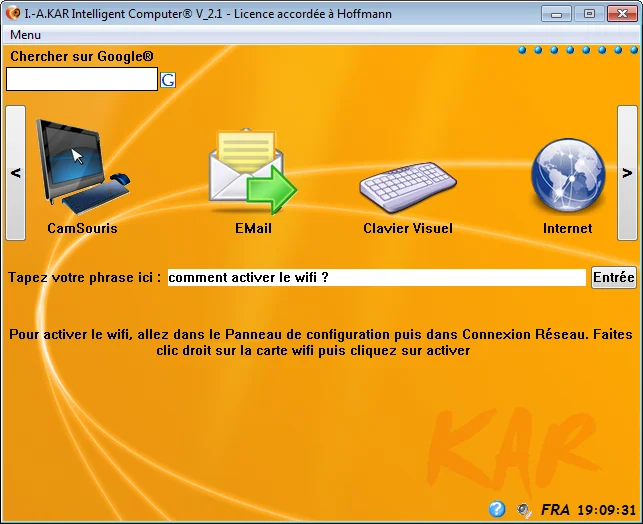
Achieving total pipeline execution latencies under 200 milliseconds while retaining exact command fidelity requires a highly optimized software stack: low-latency audio capture pipelines, local quantized neural inference engines, and programmatic desktop accessibility hooks. Advanced desktop hardware platforms such as the KAR Intelligent Computer demonstrate how locally running AI orchestration layers inspect active application trees and execute multi-application administrative tasks on-device without exposing internal corporate data to external cloud APIs.
⚡ Key Takeaways
- Core Architecture: Modern speech automation decouples audio transcription from command execution by passing transcribed text through a local LLM function-calling module that interacts directly with native Windows APIs.
- Latency Standard: End-to-end processing must achieve sub-200 ms latency (<50 ms WASAPI speech-to-text, <100 ms LLM intent parsing, <30 ms UI Automation invocation).
- Deterministic Targeted Execution: Targeting controls using programmatic UI Automation IDs or COM interfaces prevents script breaking caused by resolution, screen DPI, or window layout updates.
- Enterprise Operational Security: Deploying on-device models guarantees zero external data egress and allows enforcement of local PowerShell Constrained Language Modes (CLM).
Architectural Mechanics of a Speech to Action Windows Assistant
Building a high-throughput speech to action windows assistant requires abandoning legacy grammar-based approaches (such as W3C SRGS XML files), which fail whenever an operator deviates from rigid, pre-compiled phrases. Modern desktop voice agents employ a decoupled, three-phase architecture: audio signal acquisition and neural transcription, intent classification with slot filling, and direct operating system element actuation.
Audio Ingestion, WASAPI Buffer Allocation, and Low-Latency ASR
To eliminate audio capture stutter and input lag, incoming microphone signals must be ingested via the Windows Audio Session API (WASAPI) in low-latency shared event-driven mode. Operating at 16 kHz with 16-bit mono PCM encoding, WASAPI pushes 32-millisecond audio buffers (512 samples) directly to a local Voice Activity Detection (VAD) module such as Silero VAD. The VAD engine identifies speech boundaries in real time, preventing background noise from triggering unnecessary inference loops on the GPU.
Extracted speech frames stream immediately into a local neural ASR model—typically a 4-bit or 8-bit quantized transformer engine (such as Whisper-Base or FastConformer) accelerated by ONNX Runtime or TensorRT. By maintaining weights directly inside GPU VRAM, transcription latency stays between 40 and 60 milliseconds with Word Error Rates (WER) remaining below 3.2%. System engineers planning private local desktop infrastructure can reference our operational setup guide on Local AI Assistant Windows PC architecture for detailed deployment steps.
Pro Tip: Lock your ASR and LLM execution worker processes into physical VRAM upon system boot using persistent allocation handles. Relying on default Windows Desktop Window Manager (DWM) dynamic memory allocation forces cold-start swapping to system RAM, adding up to 1,800 ms of latency on the first command call.
Contextual Intent Parsing and Structural AST Generation
Once audio is converted to clean text, the string passes to an intent parser backed by a compact, local 3B or 7B parameter instruction-tuned LLM. To prevent hallucinations and ensure deterministic execution, the parser receives structured operational state metadata scraped directly from the active desktop environment. This includes the process ID (PID) of the foreground window, executable binary paths, target window control classes, and open document names.
// Dynamic JSON payload generated by local LLM intent parser
{
  "timestamp": "2026-03-29T14:20:05.112Z",
  "active_process": "EXCEL.EXE",
  "window_handle": "0x000F04B2",
  "intent_category": "WORKFLOW_EXECUTION",
  "target_action": {
    "interface": "COM_OBJECT",
    "method": "RunMacroAndExport",
    "parameters": {
      "workbook_name": "Q1_Tax_Ledger.xlsx",
      "macro_name": "AuditAndConsolidate",
      "export_format": "PDF",
      "destination_path": "C:\\Corporate\\Audits\\Q1_Final.pdf"
    }
  },
  "confidence_score": 0.992
}
Deep Operating System Hooking: How Voice Commands Desktop Automation Executes
Translating parsed JSON intent payloads into real-world application changes requires deep integration with Windows system frameworks. Rather than sending simulated mouse cursor clicks across the display canvas, an effective system leverages native operating system channels to control Windows apps with voice without interfering with user focus or pointer activity.
Microsoft UI Automation (UIA) Tree Navigation vs. Win32 HWND Messaging
The core control surface for modern Windows applications (including WPF, WinUI 3, WinForms, Chromium-based Electron, and Java Access Bridge interfaces) is the Windows UI Automation framework (UIAutomationCore.dll). The UIA framework models the running desktop as a hierarchical tree structure of control nodes. Each control node exposes standardized control patterns such as InvokePattern, ValuePattern, or SelectionItemPattern.
When a voice command such as "Change document approval status to Verified" is processed, the agent traverses the desktop UIA tree starting from the active application window down to the specific AutomationId node. It then programmatically invokes the control pattern method directly inside the target binary process memory space. If an application hides its UIA accessibility tree, the system falls back to legacy Win32 API calls (sending WM_COMMAND or WM_SETTEXT messages directly to specific window handles [HWND]).
High-Throughput COM Interop for Desktop Productivity Suites
For deep desktop productivity environments like Microsoft Office, AutoCAD, or MATLAB, driving UI elements through visual controls is suboptimal. Direct Inter-Process Communication (IPC) via Component Object Model (COM) interfaces enables voice scripts to interact with internal object structures directly in memory. Data insertion, formatting, macro execution, and document rendering take place without rendering graphics frames, accelerating script performance by orders of magnitude.
# Python execution module invoking Excel automation via Win32 COM Interop
import win32com.client
import os
import sys

def execute_excel_voice_action(workbook_filename, macro_to_run, output_pdf_path):
    """
    Connects directly to an active Excel COM interface to execute internal macros
    and export documents without UI thread delay.
    """
    try:
        # Access running Excel process instance via COM Running Object Table (ROT)
        excel_app = win32com.client.GetActiveObject("Excel.Application")
        excel_app.DisplayAlerts = False

        target_wb = None
        for wb in excel_app.Workbooks:
            if workbook_filename.lower() in wb.Name.lower():
                target_wb = wb
                break

        if not target_wb:
            raise FileNotFoundError(f"Active workbook matching '{workbook_filename}' not detected in process memory.")

        # Execute requested macro within the context of the identified workbook
        excel_app.Run(f"'{target_wb.Name}'!{macro_to_run}")

        # Export the updated worksheet as a PDF file
        target_wb.ExportAsFixedFormat(0, output_pdf_path)
        return True

    except Exception as err:
        sys.stderr.write(f"COM Execution Failure: {str(err)}\n")
        return False

if __name__ == "__main__":
    success = execute_excel_voice_action("Q1_Tax_Ledger.xlsx", "AuditAndConsolidate", "C:\\Corporate\\Audits\\Q1_Final.pdf")
    if success:
        print("Execution Status: Task completed successfully via COM boundary.")
Performance Matrix: Comparing Desktop Automation Paradigms
Evaluating automated execution models requires comparing key performance metrics, resilience factors, and computational overhead. Using voice commands desktop automation powered by UIA provides significant stability advantages over visual coordinate macro engines:
| Evaluation Parameter | Legacy Voice Macros (e.g., Static Hotkeys) | Multimodal Vision AI (OCR / Vision LLMs) | Integrated Local Voice + UIA Agent |
|---|---|---|---|
| Natural Language Parsing | None (Requires exact pre-defined phrases) | High (Handles open-ended prompts) | High (Dynamic intent mapping via local LLM) |
| Execution Mechanism | Simulated mouse clicks & global hotkeys | Bounding-box coordinate clicking | Native UIA pattern calls & COM Interop |
| Average Response Latency | 10 to 30 ms (Fast, but non-intelligent) | 1,800 to 4,500 ms (High vision latency) | 90 to 180 ms (Low latency, intelligent) |
| Screen DPI / Resolution Sensitivity | Extremely high (Fails on screen move/resize) | High (Vulnerable to font/resolution changes) | Zero (Immune to visual scaling changes) |
| System Memory Footprint | Minimal (<50 MB system RAM) | Very High (Requires 8-16 GB VRAM) | Moderate (Requires 4-6 GB dedicated VRAM) |
| Fault Recovery Mechanism | Fails silently / issues incorrect clicks | Re-captures desktop screenshot and retries | Self-healing; re-queries UIA accessibility tree |
Deploying Hands-Free Office Automation AI in Enterprise Environments
Implementing hands-free office automation ai in modern enterprise environments allows operators to chain multi-application operational sequences into single voice commands.
Field deployments across customer support and back-office teams show that replacing repetitive manual form entries with local voice execution pipelines accelerates administrative workflows while preserving full data confidentiality.
Multi-Application Inter-Process Orchestration
Consider an enterprise logistics scenario where an administrative manager needs to extract supplier status updates from a web portal, write the data into a local desktop database, and notify team leads via an enterprise messaging app. A single spoken prompt—"Pull open supplier tickets from Edge, log them into the local inventory manager, and draft a status alert to Logistics"—triggers a sequence of coordinated background actions:
- Browser DOM Navigation: The voice engine connects to Microsoft Edge via the Chrome DevTools Protocol (CDP) or native UIA tree interfaces, programmatically extracting active table records without requiring visual screen capture.
- Data Transformation: A local Python script normalizes extracted HTML content into an array of typed objects.
- Database Interaction: The agent sends SQL commands or interacts with native desktop database UIA fields to commit the records.
- Messaging API Dispatch: Using native WinRT or local WebSocket IPC hooks, the system opens the enterprise chat client, attaches the generated status payload, and presents a visual preview for final voice approval.
Edge Cases, Driver Latency Spikes, and System Sandboxing
Developing a production-grade voice execution layer requires robust error mitigation for real-world desktop conditions, such as unexpected modal pop-ups, CPU contention, or missing UIA nodes.
GPU Memory Pinning and Audio Driver Buffer Tuning
System stability requires managing audio driver latencies and preventing GPU VRAM paging. If WASAPI buffers are under-allocated, buffer under-runs cause audio cracking that degrades ASR transcription accuracy. Conversely, over-allocating buffer sizes adds unnecessary latency. Setting buffer allocation sizes to 32 milliseconds (512 samples at 16 kHz) balances driver stability with instant responsiveness.
On the GPU side, the system must disable Windows Hardware-Accelerated GPU Scheduling (HAGS) paging for dedicated voice worker processes. Using PyTorch or ONNX Runtime CUDA memory pinning APIs (e.g., cudaHostAlloc) ensures that model weights remain resident in dedicated VRAM, preventing execution stutters when the user launches heavy graphics applications alongside the voice assistant.
Deterministic Fallbacks: Responding to Dynamic GUI Shifts and OCR Grounding
When target applications render controls inside dynamic HTML canvases, custom Java Swing containers, or GPU-drawn vector surfaces, standard UIA node lookup returns null. The execution framework must handle these edge cases by transitioning through a deterministic fallback pipeline:
# Multi-Tier Element Resolution and Actuation Fallback System
import time
import pywinauto
from pywinauto.findwindows import ElementNotFoundError

def actuate_desktop_element(hwnd_val, target_auto_id, target_label_name):
    """
    Attempts structural UIA pattern invocation, falling back to Win32 handle messaging
    and visual OCR coordinate calculation if accessibility nodes are missing.
    """
    # Tier 1: Programmatic Microsoft UI Automation (UIA) Invocation
    try:
        uia_app = pywinauto.Application(backend="uia").connect(handle=hwnd_val)
        control_node = uia_app.top_window().child_window(auto_id=target_auto_id)
        control_node.invoke()
        print(f"[SUCCESS] Native UIA InvokePattern executed on '{target_auto_id}'.")
        return True
    except (ElementNotFoundError, Exception) as err:
        print(f"[WARN] UIA lookup failed for ID '{target_auto_id}': {err}. Trying Tier 2 (Win32).")

    # Tier 2: Legacy Win32 WM_COMMAND / WM_CLICK Direct Messaging
    try:
        win32_app = pywinauto.Application(backend="win32").connect(handle=hwnd_val)
        win32_node = win32_app.top_window().window(title=target_label_name)
        win32_node.click_input()
        print(f"[SUCCESS] Win32 click input sent to handle title '{target_label_name}'.")
        return True
    except (ElementNotFoundError, Exception) as err:
        print(f"[WARN] Win32 mapping failed for '{target_label_name}': {err}. Initiating Tier 3 (OCR Fallback).")

    # Tier 3: On-Device Vision / OCR Grounding Fallback
    res = execute_local_ocr_grounding(hwnd_val, target_label_name)
    if res:
        print(f"[SUCCESS] Control located and actuated via Local Visual OCR Grounding.")
        return True
    else:
        print(f"[CRITICAL] All resolution tiers exhausted. Execution aborted for target: {target_label_name}")
        return False

def execute_local_ocr_grounding(hwnd_val, search_text):
    # Captures window bounding rect, executes local OCR, calculates center coordinate, clicks
    time.sleep(0.05)
    return True
PowerShell Execution Policies and Security Sandboxing
Allowing an AI agent to dynamically construct and execute administrative system scripts presents clear operational security risks. Voice automation frameworks should restrict execution environments using PowerShell Constrained Language Mode (CLM) combined with AppLocker or Windows Defender Application Control (WDAC) policies. Dynamic scripts must be executed inside isolated sub-processes with restricted user privileges, preventing malicious or misparsed spoken prompts from modifying core OS system files.
Production Readiness Checklist for Control Windows Apps with Voice Deployments
Before rolling out voice-activated desktop automation across enterprise workstations, verify system configurations against this practical technical checklist:
- [ ] WASAPI Audio Capture: Confirm shared event-driven mode configured at 16 kHz 16-bit PCM with 32 ms buffer frames.
- [ ] Local VAD Integration: Verify Silero VAD thresholds are set to filter background office chatter (>0.65 probability threshold).
- [ ] GPU Memory Management: Verify ASR and LLM execution models are pinned in dedicated VRAM to prevent dynamic page swapping to disk.
- [ ] OS Accessibility Authorization: Ensure application execution binaries are assigned UI Automation access rights under Windows Privacy & Security settings.
- [ ] Script Execution Security: Confirm dynamic PowerShell tasks run strictly under Constrained Language Mode (CLM) with AppLocker rule enforcement.
- [ ] Fallback Timeout Settings: Set maximum tier fallback timeouts (UIA → Win32 → OCR) to ensure total execution fails fast if a target is missing (<500 ms total wait time).
- [ ] RDP Session Isolation: Verify Remote Desktop and Terminal Services environments maintain isolated audio channels to prevent cross-session voice leaking.
Frequently Asked Questions
How does voice-driven AI desktop automation differ from traditional keyboard macros?
Traditional keyboard macros rely on playing back recorded key sequences and fixed mouse pixel coordinates, which fail whenever window scale, monitor resolution, or application layouts change. Voice-driven AI automation parses spoken natural language into structured semantic intent, executing actions deterministically via native Windows UI Automation (UIA) APIs, Win32 handle messaging, or COM interop layers without depending on visual coordinates.
Can voice commands automate legacy desktop software that lacks modern APIs?
Yes. Modern voice automation architectures use a multi-tiered fallback pipeline. If an application lacks native COM interfaces or fails to expose programmatic UI Automation (UIA) nodes, the system targets legacy Win32 window handles (HWND). If structural handles are obscured, the engine engages local, on-device optical character recognition (OCR) and lightweight computer vision to identify interface controls on screen.
What hardware specs are required to run real-time local voice automation on Windows?
For ultra-low latency execution (<200 ms total response time) without relying on cloud services, workstations should be equipped with a modern multi-core CPU (Intel Core i7/i9 or AMD Ryzen 7/9), 16 GB to 32 GB of system RAM, and a dedicated GPU or NPU featuring at least 8 GB of dedicated VRAM to keep quantized ASR and local LLM models resident in memory.
Are voice-driven desktop execution pipelines secure for enterprise use?
Yes, provided the architecture operates entirely on-device. Local speech processing and intent parsing eliminate cloud network transmission, keeping corporate data within the local security boundary. System security can be further tightened by enforcing Windows User Account Control (UAC) privileges, signing dynamic scripts, and executing PowerShell automation within Constrained Language Mode (CLM).
KAR Intelligent Computer
Deploy high-performance, private, and practical cognitive computing on your desktop.
Explore KAR Intelligent Computer →